





What started as a Nasa Space App Challenge now becomes an extraordinary opensource achievement on the top five finalist of hackaday.io.
What is SatNOGS in non technical words: imagine a cheap mobile openhardware ground station that can collaborate through the internet with other ground stations and gather satellite signals all together, participating in a holistic opensource/opendata and public accessible database/site !
If you are thinking, that cant be right, the answer is that it is!!!
The amazing team behind the SatNOGS is working around the clock - non stop ONLY with openhardware and free software to do exactly that !
A fully modular system (you can choose your own antennas! or base setup) you can review the entire code on github, you can see in high quality videos and guides for every step, every process, you can participate via comments, emails or even satellite signals !
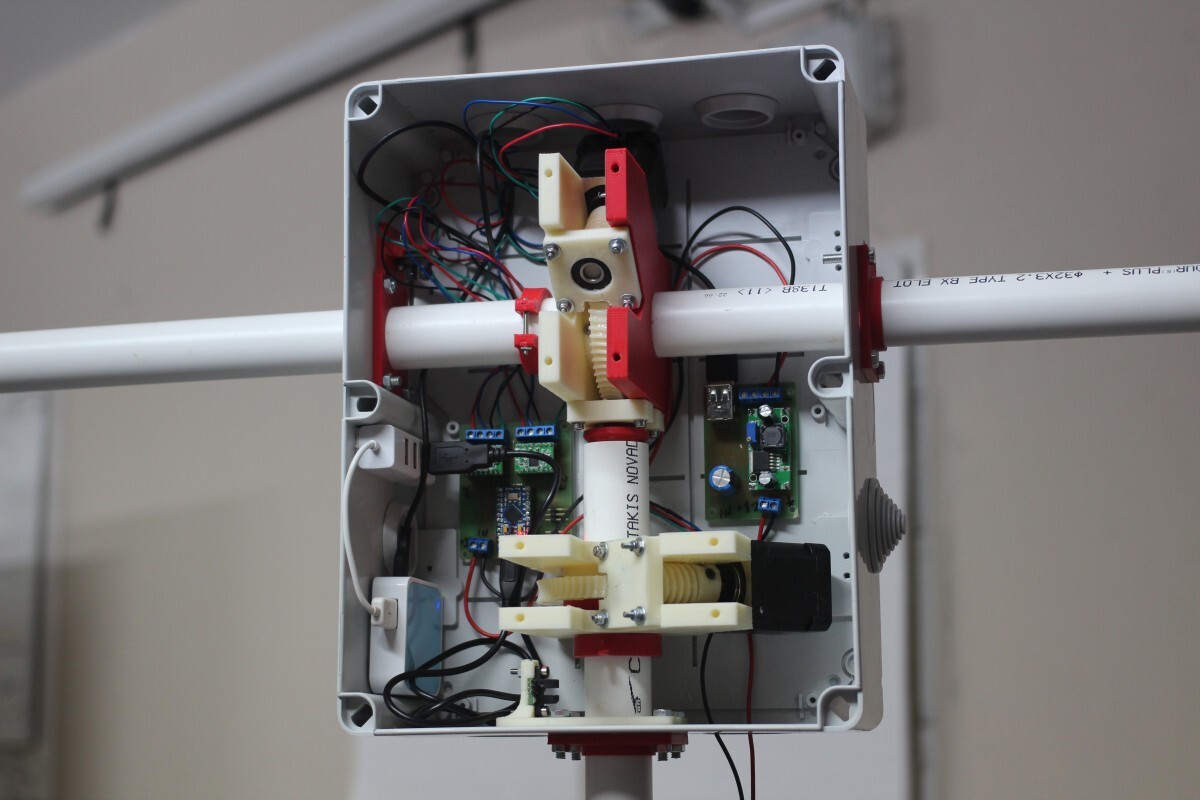
3D Printing is one of the major component in their journey till now. The have already published every design they are using for the satnogs project on github! You just need to print them. Every non-3d printing hardware are available to every hardware store near by you. The members of this project have published the Arduino code and schematics for the electronics too !!
Everything is fully documented in details, everything is open source !
AMAZING!

It’s seems that i may be bias, so dont believe anything i am writing.
See for your self and be mind-blowing impressed with the quality of their hardware documentation
Visit their facebook account for news and contact them if you have a brilliant idea about satellites or you just want to get a status of their work.
How about the team ?
I’ve met the entire team at Athens Hackerspace and the first thing that came into my mind (and it is most impressive) is the diversity of the members itself.
Not only in age (most of them are university students, but older hobbyists are participating too) but also in the technical area of expertise. This team can easily solve every practical problem they can find in the process.
SatNOGS, as I’ve already mentioned, is fully active and that all started (with the bing bang of-course) with an idea: To reach and communicate with the Space (the final frontier). Satellites are sending signals 24/7 and the ground stations cant reach every satellite (i am not talking to geo-static satellites) and there is no one to acknowledge that. The problem that the satnogs is solving is real.
And i hope with this blog post, more people can understand how important is that this project scale to more hackerspaces around the globe.
To see more, just click here and you can monitor the entire process till now.
a blog post about Wallabag
Tons of information are passing through your eyes every day. People now are browsing than reading and there are some things you really want to store and read them when you have some free time. Bookmarks are pretty useful for storing the url but the actual content could be moved somewhere else or even removed from the original place.
read-it-later applications have worked their magic and offline (or caching) storing the actual content to another location. Some of these applications (or online services) have the ability to synchronize their content to your tablet/smartphone or even your ebook reader. The most known service is, of course, pocket.
But then again you have to register to another online service that uses your email for userid and now knows every single thing you like to read! And what will happen if the company behind this service decides to close this or change their policy to sell yours info or hacked or …. whatever …. ?
Well that’s the nice thing about free software!
You can self-hosting your own application for saving web pages (aka read-it-later) with wallabag
Just download and extract the latest version inside your web server document root path:
cd /var/www/

wget -c http://wllbg.org/latest -O wallabag_latest.zip
unzip wallabag_latest.zip
mv wallabag_VERSION wallabag
At this moment you have your own self-hosted read-it-later service.
You need to generate a token for apps to connect with your wallabag instance (login –> config –> Feeds –> generate token) and it will produce something like that:
Token: sd/sdfSDFsdffd20
User ID: 1
Add the firefox add-on from here and then you have to configure only your wallabag URL.
For your smartphone you can use this app
wallabag from F-droid
For this app you need to write the token so that you can synchronize your feeds to your phone.
Wallabag has many features - the most useful for me is the epub export. I can store my articles to my ebook reader !
How about security ? I dont care to setup wallabag under an SSL certificate or bother with “basic auth” login cause i store public articles !!! If someone obtains my credentials he/she/it can use wallabag to mesh with my articles (ok - i have backups) but he/she/it will not gain access to “private” information. That’s said - that dont mean that i dont value of the above (on the contrary) - is just a way to say that in my wallabag instance, i only store already public/publish web pages!
[Edit] UX - update - support - donate
I forgot to mention on my original post that i do appreciate 3 major things when using an free software project.
First is the UX, if something is toooooo difficult for me to use it, i’ll pass it. Even if it is the best project ever. Wallabag isnt top notch on UX, but the design isnt destructive at all when reading an offline article. The work that nicosomb have made on that is really nice.
Second thing the update process: If is too hard for me to update a project, soon i will be bored to do it. I am an intermediate linux user and an open source advocate but i am lazy. Too lazy. Wallabag is super easy to update. Just download and extract. I am amazed that this process isnt already inside wallabag config section. I hope to see that in the next release. But it’s really nice to be notified (internal checks when using config page) and do the hard work of opening a shell, login, download and extract the new release :P
Third thing in my forgot list is support. Wallabag is active and has a new support process. Something that not many opensource projects have. And Nicola (core developer) isnt a hard man to find on social media. That’s always something useful and handy for small things but a known fact that the developer is not MIA.
Finally i choose to support projects via donations. My donates are always smalls - cause i dont have (yet) millions to spare. But even a small contribution from many people can manage to pay for the VPS or other costs that the developer have to pay from his pocket.
Fairphone
How to disable the camera shutter sound:
code snippet only
[root@myhomepc platform-tools]# ./adb shell
shell@android:/ $ su
shell@android:/ # mount -o rw,remount /system
shell@android:/ # echo '' > /system/media/audio/ui/camera_shutter.ogg
If you missed my previous blog post about fairphone click here: here.
this blog post document how to became root and do “advanced” staff.
iFixit
Fairphone comes with an iFixit app - and of course with some other apps too ;)
If you want to remove it, you can simply connect your phone with your linux box, open USB debugging and adb shell through your phone
Fairphone is already rooted, so when you connect to it via adb, simply type:
su
to became root.
eg.
# adb shell
shell@android:/ $ su
shell@android:/ #
You can do what-ever you like - but be careful with it !
Next, remount your system partition to be read-write:
# mount -o rw,remount /system
and then simply remove the app you dont need:
# rm /system/app/FairPhoneIFixIt.apk
(you can alternative use an App-Remove application - but this is more fun, right ?)
and now to the more interesting thing:
Busybox
How to add busybox to your Fairphone.
You need to download the busybox-armv7l from here
and use adb to push it to your phone:
adb push busybox-armv7l /sdcard/
after that, connect via adb shell, become root, open system to read-write and
cp /sdcard/busybox-armv7l /system/bin/
Fairphone comes with toolbox
There are a few commands point to toolbox:
cat chmod chown cmp cp date dd df dmesg du getevent getprop grep hd id ifconfig iftop insmod ioctl ionice kill ln log ls lsmod lsof md5 mkdir mount mv nandread netstat newfs_msdos notify printenv ps reboot renice rm rmdir rmmod route schedtop sendevent setconsole setprop sleep smd start stop sync top touch umount uptime vmstat watchprops wipe
but busybox has move power:
[, [[, acpid, add-shell, addgroup, adduser, adjtimex, arp, arping, ash,
awk, base64, basename, beep, blkid, blockdev, bootchartd, brctl,
bunzip2, bzcat, bzip2, cal, cat, catv, chat, chattr, chgrp, chmod,
chown, chpasswd, chpst, chroot, chrt, chvt, cksum, clear, cmp, comm,
conspy, cp, cpio, crond, crontab, cryptpw, cttyhack, cut, date, dc, dd,
deallocvt, delgroup, deluser, depmod, devmem, df, dhcprelay, diff,
dirname, dmesg, dnsd, dnsdomainname, dos2unix, du, dumpkmap,
dumpleases, echo, ed, egrep, eject, env, envdir, envuidgid, ether-wake,
expand, expr, fakeidentd, false, fbset, fbsplash, fdflush, fdformat,
fdisk, fgconsole, fgrep, find, findfs, flock, fold, free, freeramdisk,
fsck, fsck.minix, fsync, ftpd, ftpget, ftpput, fuser, getopt, getty,
grep, groups, gunzip, gzip, halt, hd, hdparm, head, hexdump, hostid,
hostname, httpd, hush, hwclock, id, ifconfig, ifdown, ifenslave,
ifplugd, ifup, inetd, init, insmod, install, ionice, iostat, ip,
ipaddr, ipcalc, ipcrm, ipcs, iplink, iproute, iprule, iptunnel,
kbd_mode, kill, killall, killall5, klogd, last, less, linux32, linux64,
linuxrc, ln, loadfont, loadkmap, logger, login, logname, logread,
losetup, lpd, lpq, lpr, ls, lsattr, lsmod, lsof, lspci, lsusb, lzcat,
lzma, lzop, lzopcat, makedevs, makemime, man, md5sum, mdev, mesg,
microcom, mkdir, mkdosfs, mke2fs, mkfifo, mkfs.ext2, mkfs.minix,
mkfs.vfat, mknod, mkpasswd, mkswap, mktemp, modinfo, modprobe, more,
mount, mountpoint, mpstat, mt, mv, nameif, nanddump, nandwrite,
nbd-client, nc, netstat, nice, nmeter, nohup, nslookup, ntpd, od,
openvt, passwd, patch, pgrep, pidof, ping, ping6, pipe_progress,
pivot_root, pkill, pmap, popmaildir, poweroff, powertop, printenv,
printf, ps, pscan, pstree, pwd, pwdx, raidautorun, rdate, rdev,
readahead, readlink, readprofile, realpath, reboot, reformime,
remove-shell, renice, reset, resize, rev, rm, rmdir, rmmod, route, rpm,
rpm2cpio, rtcwake, run-parts, runlevel, runsv, runsvdir, rx, script,
scriptreplay, sed, sendmail, seq, setarch, setconsole, setfont,
setkeycodes, setlogcons, setserial, setsid, setuidgid, sh, sha1sum,
sha256sum, sha3sum, sha512sum, showkey, slattach, sleep, smemcap,
softlimit, sort, split, start-stop-daemon, stat, strings, stty, su,
sulogin, sum, sv, svlogd, swapoff, swapon, switch_root, sync, sysctl,
syslogd, tac, tail, tar, tcpsvd, tee, telnet, telnetd, test, tftp,
tftpd, time, timeout, top, touch, tr, traceroute, traceroute6, true,
tty, ttysize, tunctl, udhcpc, udhcpd, udpsvd, umount, uname, unexpand,
uniq, unix2dos, unlzma, unlzop, unxz, unzip, uptime, users, usleep,
uudecode, uuencode, vconfig, vi, vlock, volname, wall, watch, watchdog,
wc, wget, which, who, whoami, whois, xargs, xz, xzcat, yes, zcat, zcip
to add a new command to your fairphone just link it against busybox:
shell@android:/system/bin # ln -s busybox vi
from here … you can do pretty much whatever you like !.
I am a proud owner of a fairphone.
For about ~300 euros i bought a really cool smartphone.
When you boot up your phone for the first time, there is a widget to add support for google apps.
Just remove it and go on with your life. Nothing useful here.
[EDIT #1] Before we begin our beautiful opensource journey, you must have in mind that ALL your personal devices can be hacked, stolen or be destroyed (crashed/brick/whatever). You have to remember that - you should have your digital data elsewhere and sync/backup/encrypt EVERYTHING. So dont use your phone as an offline image gallery, dont save everything in our mails.
First thing: Encrypt the /sdcard
You need to add a PIN to screen lock (Settings –> Security –> Screen Lock –> PIN)
after that tap through: Settings –> Security –> Encryption –> Encrypt device
Be aware: THIS MUST BE the first thing, cause every data on your SD (internal/external) will be destroyed.
So you have to unlock the screen everytime with that PIN and it’s the same PIN that you need to type on boot time. Not very safe.
It’s safer to change the PIN to decrypt your card with a passphrase. There is an excellent article here or just use (without reading) this app: Cryptfs Password
I downloaded the app (through the f-droid site and not through f-droid app), i’ve changed the PIN to a PASSPHRASE and then removed the app from my phone.
AGAIN you must be sure that no data are in your SDCARD.
Verify that your phone is booting up fine, decryption is using the passphrase, there is an unlock PIN for you mobile card and a different PIN to unlock your screen lock.
It’s not paranoia (not yet) but it’s the most safe and easy thing you can do.
Below i will just document the apps i am using through F-Droid:
- AdAway - Do remove ads
- AFWall+ - Firewall App
- Autostarts - Disable apps from starting at boot (or other state of your phone)
- Barcode Scanner - QR decoder and more
- DavDroid - CardDAV/CalDAV client
- DiskUsage - Disk Usage
- Epub3 Reader - Cause i read epub books
- F-droid - Free software for your android
- Firefox - Web Browser
- k9 - email client
- OpenFlashLight - a simple flash light
- OsmAnd~ - Openstreet Navigator (and more)
- RMaps - Map Client (and more)
- Ted - simple text editor
- Terminal Emulator - cause let’s face it, if you have a shell access you can do everything.
- Tincd-vpn - Vpn client
- VuDroid - Pdf Reader
- Wallabag - offline read later app
- Xabber - Jabber client
There are two closed source apps that i am using and couldnt find a decent replacement on f-droid (and believe me when i am telling you that i’ve tried a few).
- MyBookDroid - book cataloging
- Tweedle - twitter client
MyBookDroid is nowhere to find - I’ve moved it from my previous phone
[EDIT 2]: I’ve installed Twidere and used it for a while - but i didnt like it.
I will document the use of DavDroid to another blog post - cause you need a free software card/cal DAV server to use it.
DavDroid will give you the ability to synchronize your contacts against your own server.
K-9 has the ability to add PGP support - to encrypt your emails when talking to a recipient with PGP.
I will also document k-9 with my mail server setup.
Same thing about openvpn client.
So here it is !
The last couple months (all started when comzeradd ordered two fairphones) i am going through the Great Transition: “Moving Away from every closed source/service to free (opensource) software.”
As i have already mentioned: Moving to free/opensource applications isnt always easy. But then again, when freedom was an easy thing ?.
So the transition has a few bumps in the way.
Some of my decisions are in my twitter’s timeline and some on my wiki.
I will document EVERYTHING but I’ll do it on separated blog posts and code will be in my wiki so that the entire documentation will no be a huge mesh.
I am fortunate enough to have smarted people than me to suggest brilliant things all the time.
Their comments (twitter/blog/mail) have made my life easier and are helping me with this transition.
I would love to read your comments (just remember that i dont accept http links inside blog comments).
So let’s start !
Some time in the last week, the iscsi volume of one of our PostgreSQL went up to 98% and nagios vomited on the standby mobile.
The specific postgres database holds customer’s preferences related to our webmail.
Unfortunately the webmail is a java web app (tomcat) - custom written by some company and the source code is a spaghetti mesh. The code has also gazillion bugs, so we took a decision to migrate to an opensource php based webmail. Hopefully in the near future we will official migrate to the new webmail platform and all known problems to humanity will cease to exist.
Till that time, we have to maintain the current webmail platform and figure out how a ~500Mb database has become a nearly ~50Gb nightmare!
My knowledge on databases are not basic but to be fair i lack in experience. As a veteran standby engineer I know that I need to apply a quick & dirty patch and investigate afterworks. Also I am not afraid to ask for help! And so i did.
First thing to do: increase the volume on the storage machine. I’ve said already that we are using an iscsi partition so it’s pointless that action. In fact - no it isnt !!! The storage machine has a percentage for reserving storage for snapshots. And the increase gave us a little space to breath as the snapshots were “eating” space from the actual volume! You are probably thinking that we should resize the partition - but this is a live-production machine and we dont want a downtime on the service (umount/resize/mount).
From 98% to 93% with only one command.
Second, but most popular thing to do, was VACUUM. A colleague took that step and tried to VACUUM each table separately so not to “lock” or provoke the daemon to a crash or even worst. That gave us a 88% of free space and the time to think before we act again.
For all you people that dont know postgres, postgres doesnt delete actual data from the storage only from the database. So you need to enable autovacuum or vacuum by hand from time to time.
Of course before everything else (or even vacuum) we took a pg_dump to another partition.
But pg_dump was taking hours and hours to complete.
After further investigation, we found a table that pg_dump was getting difficult with.
Fired up a new database and tried to restore this table there.
I couldnt. There was an error of duplicates and the restoration process was failing.
Tried to figured out the duplicate entries. 20 entries! The table has only four columns and a ~ 50.000 data entries. Only 20 of them were duplicates. The amount of data in size is ~20Mb. I was looking the data/entries and removed by hand the duplicates. After that i re-index the specific table and an hour later over 20Gb were free. Down to 44% from 98% by deleted 20 entries.
At that point i was thinking that postgres is mocking me. How the hell a 20Mb table had gone over 20G ?
Now pg_dump is taking 6.5 minutes - but is still taking a long time to dump this specific table.
Tomorrow is a new day to experiment with PostgreSQL
[edit1]: Just to be fair, postgres version is 8.1
[edit2]: The VACUUM process just finished. Another 20G free !!! So in total for 20 duplicate entries a total 40G disk free! We are now at 9% from 98% of used disk.
PS: We have already discussed a lot of plans (upgrade postgres version, restore the dump to a new machine etc etc) in our department but we believe not to focus to any of them (yet) as we havent found the trigger that fired up the database from 500Mb to 50Gb. After that all plays are in hand.
Most of the people that read this blog post should already know what Two-Factor Authentication is.
For those you don’t, in short terms 2FA is when you can login to a server/site/application using two things and not only one (your password).
Something you have and something you know, like when using your bank card (something you have) with it’s pin (something you know).
There are three (3) android apps at f-droid
- Google Authenticator
- FreeOTP
- Gort
I dont want to use the google authenticator, and i havent yet tested FreeOTP, so i’ve chosen Gort to write about.
Gort is using the barada-pam package as the back-end.
Barada/Gort are based on HMAC-Based One-Time Password Algorithm and not on time sync. This is useful if the clocks are drift and the server (barada) can “catch” one-time passwords even if the counter is out-of-sync by a little.
I ‘ve built a Docker image to show barada/gort on the next Security Talk at Athens,Greece Hackerspace and below is the link on my wiki that contains the Dockerfile.
Be aware on the notes/comments on the file.
I like to read.
One of my biggest fears is that I ‘ll never be able to read all the books I’ve checked in my entire life. Even in this technological era that everything is easier and faster - the amount of free time is always less than the year before. That’s the way it is for me and it seems that i can’t do anything to fix it. So i like to keep a short book list - cause my long book list is about a million of unread books (give or take a few thousands). I understand that the previous statement is somehow an overstatement but as I’ve already mentioned in the begging of this blog post, i like to read (although i am not a very smart person).
I never had read William Gibson and I thought to start with the Neuromancer. This would be my first cyberpunk culture book EVER so I believed that i would loved it.

If you have good friends - as i do - they will find a loophole to screw with you, in everything you ‘ll ever do. And so they did! They told me to stop reading Neuromancer and start the Burning Chrome by William Gibson.

And so I did! Burning Chrome is a collection of cyberpunk - science function short stories that are written before Neuromancer and that was my first intro to cyberpunk.
After that … i was reading about Transhumanism and watched videos about it.
But the most important thing of all is the fun of knowledge !
I wish i could figured it out that when i was young, in school and not arguing all day with my teachers about everything.
So I am finally reading Neuromancer! I am at 40% on the ebook, 50 days after my first attempt to read it.
It seems that you can push a WPAD to desktops via dhcp.
My proxy is based on squid running on 8080.
I ‘ve build a WPAD file similar to the below:
wpad.dat
function FindProxyForURL(url, host)
{
        return "PROXY 192.168.1.2:8080; DIRECT";
}
next thing is to publish it via a web server.
I am using thttpd for static pages/files:
how to test it:
# curl -L 192.168.1.2/wpad.dat
after that a simple entry on Dnsmasq
dhcp-option=252,"http://192.168.1.2/wpad.dat"
and restart your dnsmasq
Dont forget to do a dhcp release on your windows machine
Title: dnsmasq with custom hosts file - aka ban sites with dnsmasq
I ‘ve already said it too many times, but dnsmasq is a beautiful project for SOHO (small office/home office) environment.
I am using it as DNS caching server, DHCP server & tftpd (PXE) server and it’s amazing.
One thing i do with the dns section is that i “BAN” urls i dont like. Think something like AdBlock on firefox.
Two configuration changes:
A.
as root
wget http://winhelp2002.mvps.org/hosts.txt -O /etc/hosts.txt &&
and
B.
in /etc/dnsmasq.conf
addn-hosts=/etc/hosts.txt
You can also put the wget cmd in your crontab with the @monthly scheduler but you need to restart the dnsmasq every month!
Another amazing thing is that you can add your one entries:
echo 0.0.0.0 www.facebook.com >> /etc/hosts.txt
restart your dnsmasq service and check it:
# dig www.facebook.com @localhost +short
0.0.0.0
I have decided to expire my current PGP key:
0×5882be3def6dc21a is the long version !
in 30 days from now, on 25 Sep 2014.
You can still use it to send me encrypted msg and i will use it to digital sign emails (and other staff) till that day.
After the 25th of Sep you may assume that this key is no longer valid.
I haven’t decided yet if i want to upload or advertise my new GPG key.
“Πελάτης” - προσοχή στα quotes - αγόρασε ένα domain από εμάς.
Έπειτα και χωρίς καμία επικοινωνία με το helpdesk ή τους εμπορικούς
δήλωσε ότι εμείς κάνουμε secondary dns service για αυτόν.
Έβαλε επίσης ως MX server ένα δικό μας μηχάνημα,
το οποίο δεν είναι καν ΜΧ server.
Φυσικά παρέχουμε dns secondary υπηρεσία & backup MX service
αλλά φυσικά το κάνουμε αφού μιλήσει ο πελάτης με το helpdesk
και το εμπορικό τμήμα.
Το θράσος του υποτιθέμενου πελάτη έφτασε στο σημείο
να διαμαρτυρηθεί εντόνως γιατί κι ενώ αυτός στην ζώνη του
τα έχει περάσει σωστά !!!!!!!! εμείς δεν του παρέχουμε
καμία από αυτές τις υπηρεσίες ?
I use dd frequently. Especially when i need a backup disk image to restore it to a disk with the same geometry. Most of the case this disk image has partitions. Mounting those partitions to my system is really easy with losetup. So i gathered some basic examples here: losetup examples .
Μιας και δεν χωράει στο twitter: Η αδελφούλα μου, μόλις ξεκίνησε να βλέπει το Breaking Bad.
Οπότε σχολιάζει την γαματοσύνη του με το παρακάτω:
“Άσε ρε, όλα βγαλμένα μέσα απο τη ζωή είναι.. στη Β λυκείου ο καθηγητής της Βιολογίας έφτιαχνε παράνομα cd και τα πουλούσε μέχρι που τον πιάσανε”
αχααχαχαχχαχαχαχαχα
This post is being written only in Greek.
[ disclaimer: Το παρακάτω είναι μια φανταστική ιστορία ]
Τα πράγματα δεν φαίνονται να πηγαίνουν πολύ καλά, οργανωτικά. Επιστρέφω μετά από 10 μέρες στην δουλειά για να διαπιστώσω ότι έχει γίνει εκ νέου αναδιοργάνωση. Νέος προϊστάμενος, υποδιευθυντής, διευθυντής κλπ κλπ κλπ κλπ - έχω πια ξεχάσει/χάσει την ιεραρχία - γενικά δεν ισχύει απολύτως τίποτα από ότι ίσχυε πριν από 10 μέρες. Το βασικό πρόβλημα είναι ότι χρειαζόμαστε υπαλλήλους και τα τελευταία χρόνια έχουμε γεμίσει - σε πλήθος - περισσότερους διοικητικούς από ότι ανθρώπους που παράγουν έργο.
Κι εκτός αυτού τέλος Ιουλίου/αρχές Αυγούστου μπήκε production νέο πληροφοριακό σύστημα για τις παραγγελιοληψίες. Το μόνο πρόβλημα που έχουμε, είναι ότι δεν δουλεύει όπως πρέπει ! Κατά την μεταβίβαση/φορητότητα (και διάφορες άλλες περίεργες λέξεις) το νέο σύστημα βγάζει inactive & expired τους πελάτες !!
Μετά από mini investigation, κι θέλω να πιστεύω ευλόγως απορία μου, ρωτώ: “Ποιο το workaround ? Πότε θα επιληφθεί ? κι Αφού δεν δουλεύει γιατί δεν επιστρέφουμε στο παλιό μέχρι να διορθωθούν τα προβλήματα ?”
και κάπου εκεί ξεκινά ο παραλογισμός:
- “Εμείς παραδώσαμε το project εντός προθεσμίας”
- “Μα δεν δουλεύει !”
- “Είναι μονάχα μια λειτουργία”
- “Μα υπάρχει ροή που βγάζει τους πελάτες inactive/expired”
- “Θα διορθωθεί σε μέλλοντα χρόνο, εμείς το παραδώσαμε στην ώρα του”
- “ΜΑ ΔΕΝ ΔΟΥΛΕΥΕΙ”
Όπως φαίνεται το να παραδίδεις κάτι εντός προθεσμίας είναι κάτι που επιτυγχάνει τους στόχους της εταιρείας.
Το να δουλεύει όμως ή όχι. Το γεγονός ότι δημιουργούμε πρόβλημα σε χιλιάδες πελάτες, επίσης όχι.
Κατά τα άλλα, πλέον αυτό το POST θεωρείτε βάση κανονισμού εργασίας ως πειθαρχικό παράπτωμα μιας και “χαλάει” το όνομα της εταιρείας !
This is pretty simple to even document, but i need a reference point !
<VirtualHost 1.2.3.4:80>

        ServerName example.com
        Redirect permanent / https://example.com

</VirtualHost>
dont forget to create the https virtual host, something like that:
<VirtualHost 1.2.3.4:443>

        ServerName example.com

        ServerAdmin admin@example.com

        # Logs
        CustomLog logs/example.com.access.log combined
        ErrorLog  logs/example.com.error.log

        DocumentRoot /www/examplecom
        DirectoryIndex index.html

        <Directory "/www/examplecom">
                Order allow,deny
                Allow from all

                AllowOverride All

                AuthType basic
                AuthName "Enter At Your Own Risk"
                AuthUserFile /www/htpasswd_for_examplecom
                Require valid-user

        </Directory>

        # HSTS
        Header always set Strict-Transport-Security "max-age=31536000; "

        # SSL Support
        SSLEngine on

        SSLProtocol all -SSLv2 -SSLv3
        SSLHonorCipherOrder on
        SSLCipherSuite HIGH:!aNULL:!MD5

        SSLCertificateFile      /certs/examplecom.crt
        SSLCertificateKeyFile   /certs/examplecom.key
        SSLCertificateChainFile /certs/class3.crt

</VirtualHost>
Just finished
The Man Who Mistook His Wife for a Hat and Other Clinical Tales by Oliver Sacks
a book about clinical stories on neuropsychology !

next book in list:
I’ve written down some simple (i hope) instructions on creating an encrypted btrfs raid1 disk !
My notes have the form of a mini howto, you can read all about them here: